Making a Tesseract model for my license plates
Requirements
First download the following repository:git clone https://github.com/tesseract-ocr/tesstrain.git
Navigate to the folder: cd tesstrain
Compile the application:make tesseract-langdata
Make a new to save the default language model to: mkdir -p usr/share/tessdata
Now download the model: wget -P usr/share/tessdata https://github.com/tesseract-ocr/tessdata_best/raw/main/eng.traineddata
Making the dataset
I made pictures of random cars outside for my other model. When you have a decently sized dataset (I used 279 images) make sure to extract the license plates from the images using the data from Label Studio. This is a python script I used:
import os
import cv2

# Define paths
labels_path = 'dataset/licensePlate/yolo/labels/'
images_path = 'dataset/licensePlate/yolo/images'
output_path = 'licenseplates/'

# Make sure output directory exists
os.makedirs(output_path, exist_ok=True)

def extract_license_plate(image_name):
    # Load image
    img_path = os.path.join(images_path, image_name)
    image = cv2.imread(img_path)
    height, width, _ = image.shape

    # Corresponding label file
    label_file_name = f"{os.path.splitext(image_name)[0]}.txt"
    label_file_path = os.path.join(labels_path, label_file_name)

    if not os.path.exists(label_file_path):
        print(f"No label found for {image_name}")
        return

    with open(label_file_path) as f:
        lines = f.readlines()

    for line in lines:
        parts = line.strip().split()
        class_id = int(parts[0])

        if class_id == 1:
            x_center, y_center, w, h= map(float ,parts [1:] )

            x_min=int((x_center-w /2)*width )
            y_min=int((y_center-h /2)* height )
            x_max=int((x_center+ w /2)*width )
            y_max=int((y_center+h /2 )*height )

            cropped_img=image[y_min:y_max,x_min:x_max]

            # Save the cropped image as a PNG file
            png_output_file_name=os.path.join(output_path,f"lp_{os.path.splitext(image_name)[0]}.png")
            cv2.imwrite(png_output_file_name,cropped_img)
            print(f"Cropped image saved as {png_output_file_name}")

for image_filename in os.listdir(images_path):

     if image_filename.endswith(('.jpg','.jpeg','.png')):

         extract_license_plate(image_filename)

print("License plate extraction complete.")
NOTE: The images have to be in PNG format. If they aren’t, run this.mogrify -format png *.*
Process the dataset
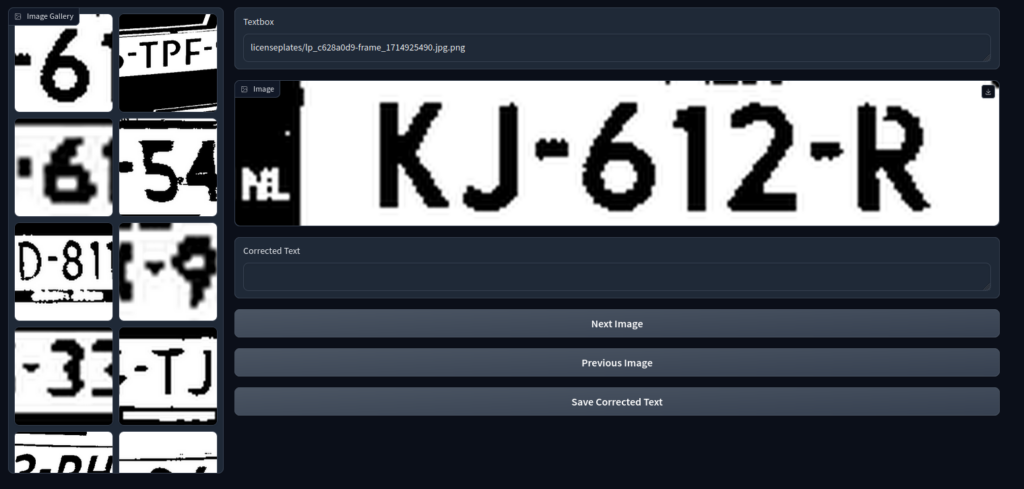
This step will involve quite a bit of work, sadly. You will need to create a file, a .tg.txt file with the same name as the image. Here is a python script using gradio to make this a bit easier. Please note the image_folder. Point that folder to your dataset.
import gradio as gr
from PIL import Image
import os

image_folder = "licenseplates"
image_files = [os.path.join(image_folder, f) for f in os.listdir(image_folder) if os.path.isfile(os.path.join(image_folder, f))]
current_image_index = 0

def load_image_and_text(evt: gr.SelectData):
    global current_image_index, image_files, corrected_output
    image_path = os.path.join(image_folder, evt.value["image"]["orig_name"])
    current_image_index = image_files.index(image_path)
    text = read_text(image_path)
    return image_path, text

# Create a Gradio Interface
with gr.Blocks() as app:

    # Function to save the corrected text
    def save_corrected_text_gr(filename, text):
        original_filename = filename.rsplit("/", 1)[-1].rsplit(".", 1)[0]
        with open(f"{image_folder}/{original_filename}.gt.txt", "w") as text_file:
            text_file.write(text)

    def read_text(image_file_path):
        # Extract the base filename without the directory path and extension
        base_filename = os.path.basename(image_file_path).rsplit(".", 1)[0]
        text_file_path = f"{image_folder}/{base_filename}.gt.txt"

        # Check if the corresponding .gt.txt file exists
        if os.path.exists(text_file_path):
            # Read the text from the file
            with open(text_file_path, "r") as file:
                text = file.read()
        else:
            # If the file does not exist, set text to an empty string
            text = ""

        return text

    # Update the next_image and previous_next functions to refresh the image component
    # Update the next_image and previous_image functions to use read_text
    def next_image():
        global current_image_index, image_display, image_files, corrected_output
        if current_image_index < len(image_files) - 1:
            current_image_index += 1
            n_image = image_files[current_image_index]
            # Read text from corresponding text file
            text = read_text(n_image)
            return (n_image, text)

    def previous_image():
        global current_image_index, image_display, image_files, corrected_output
        if current_image_index > 0:
            current_image_index -= 1
            p_image = image_files[current_image_index]
            # Read text from corresponding text file
            text = read_text(p_image)
            return (p_image, text)

    with gr.Row():
        with gr.Column(scale=1):
            image_list = gr.Gallery(label="Image Gallery", value=image_files, allow_preview=False)

        with gr.Column(scale=4):
            current_image_file = gr.Textbox(image_files[current_image_index])
            image_display = gr.Image(current_image_file.value)
            current_image_file.change(fn=lambda o: o, inputs=[current_image_file], outputs=[image_display])
            corrected_output = gr.Textbox(label="Corrected Text", interactive=True)

            # Create the buttons to go to the next and previous image
            next_button = gr.Button("Next Image").click(fn=next_image, inputs=[], outputs=[current_image_file, corrected_output])
            previous_button = gr.Button("Previous Image").click(fn=previous_image, inputs=[], outputs=[current_image_file, corrected_output])

            # Create the button to save the corrected text
            save_button = gr.Button("Save Corrected Text").click(
                fn=save_corrected_text_gr,
                inputs=[current_image_file, corrected_output],
                outputs=[]
            )

    image_list.select(load_image_and_text, outputs=[current_image_file, corrected_output])

    # Launch the interface
    app.launch()
It will look like this.
Train the model
First navigate to the tesstrain folder you cloned before:cd tesstrain
Now copy your dataset to the required folder:cp -r {LOCATION_OF_DATASET}/* data/licenseplates-ground-truth
Train the model:make training MODEL_NAME=licenseplates START_MODEL=eng FINETUNE_TYPE=Impact
Move the new model to the model folder:sudo cp data/licenseplates.traineddata /usr/share/tessdata
Using the model
To use the new model:tesseract data/licenseplates-ground-truth/lp_5c3f36e7-20240601_194130.png output -l licenseplates
NOTE: The image you are going to run this on need to be processed by this script:
import cv2
import numpy as np
from scipy.ndimage import interpolation as inter
import os

def rotate_image(image, angle):
    (h, w) = image.shape[: 2]
    center = (w // 2, h // 2)
    M = cv2.getRotationMatrix2D(center, angle, 1.0)
    corrected = cv2.warpAffine(image, M, (w, h), flags = cv2.INTER_CUBIC, \
        borderMode = cv2.BORDER_REPLICATE)
    return corrected

def determine_score(arr):
     histogram = np.sum(arr, axis = 2, dtype = float)
     score = np.sum((histogram[..., 1 :] - histogram[..., : -1]) ** 2, \
        axis = 1, dtype = float)
     return score

def correct_skew(image, delta = 0.1, limit = 20):
     thresh = cv2.threshold(image, 0, 255, cv2.THRESH_BINARY_INV | cv2.THRESH_OTSU)[1]
     angles = np.arange(-limit, limit + delta, delta)
     img_stack = np.stack([rotate_image(thresh, angle) for angle in angles], axis = 0)
     scores = determine_score(img_stack)
     best_angle = angles[np.argmax(scores)]
     corrected = rotate_image(image, best_angle)
     return best_angle, corrected

def correct_image(image):
    # treshold color
    outfile = cv2.threshold(corrected, 66, 255, cv2.THRESH_BINARY_INV | cv2.THRESH_OTSU)[1]
    # invert image
    return (255-outfile)

image_folder = 'lp'
output_folder = 'lp2'
if not os.path.exists(output_folder):
    os.makedirs(output_folder)

for filename in os.listdir(image_folder):
    if filename.endswith('.png'):
        image = cv2.imread(os.path.join(image_folder, filename), 0)
        angle, corrected = correct_skew(image)

        output_filename = os.path.join(output_folder, filename)
        cv2.imwrite(output_filename + ".png", correct_image(corrected))